Bringing Nature and Typography Together with ABC Procreate Brush Stamp Leaves Design
Creative workflows often hit a snag when you are trying to balance speed with aesthetic quality. You have a vision for a botanical-themed invitation or a custom sticker sheet, but drawing each leaf by hand feels tedious, and standard fonts lack that organic, hand-drawn charm. This is where the ABC Procreate Brush Stamp Leaves Design changes the game. It is not just another digital asset; it is a streamlined tool that merges the elegance of typography with the natural beauty of foliage, allowing creators to produce professional-grade designs in minutes rather than hours.
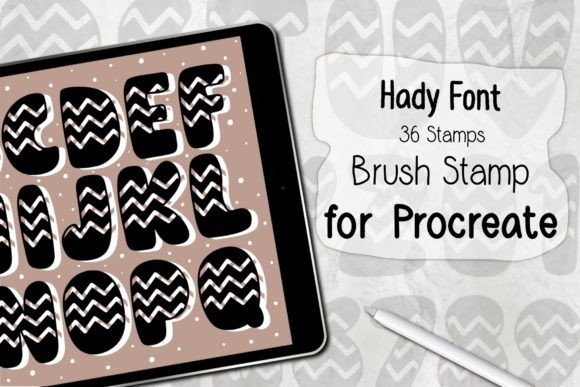
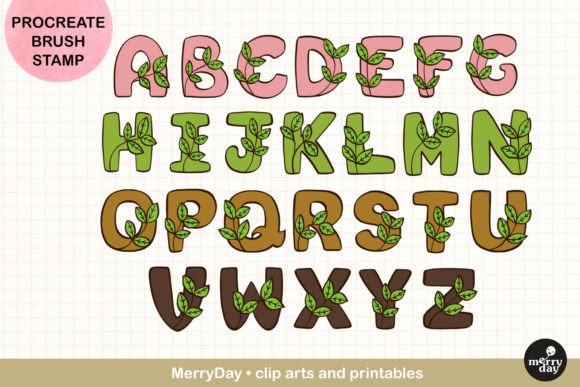
For anyone using an iPad for creative work, understanding how to leverage specialized brush sets can significantly elevate your output. This particular set offers twenty-six alphabet letter stamps, each intricately designed with leaf motifs. The result is a cohesive design language that feels both fresh and sophisticated. Whether you are a seasoned graphic designer or a hobbyist looking to personalize gifts, this tool removes the technical barriers to creating complex, nature-inspired typography.
Why Hybrid Typography Matters in Modern Design
We live in a visual era where authenticity stands out. Mass-produced clip art and rigid digital fonts often feel cold or generic. Consumers and audiences are drawn to designs that feel handcrafted and personal. The ABC Procreate Brush Stamp Leaves Design bridges the gap between digital efficiency and artisanal appeal. By stamping letters that are already integrated with leaf elements, you bypass the need to manually layer text over separate botanical illustrations. This ensures perfect alignment and consistent styling every time.
This consistency is crucial for branding and cohesive projects. When you are designing a series of social media posts, a wedding suite, or a product line, having a unified visual thread makes your work look polished and intentional. The leaf details add texture and depth, making simple words pop without requiring advanced illustration skills. It allows you to focus on composition and color theory rather than getting bogged down in the minutiae of drawing individual veins on leaves.
Real-World Applications for Creators and Entrepreneurs
The versatility of this brush set means it fits seamlessly into various professional and personal projects. Here is how different users can maximize its potential:
- Stationery and Greeting Card Designers: Creating custom cards for birthdays, weddings, or holidays becomes effortless. You can quickly spell out names or messages like "Thank You" or "Congratulations" with a botanical flair that resonates with eco-conscious or nature-loving clients. The ability to recolor each stamp means you can match specific wedding palettes or seasonal themes instantly.
- Small Business Owners and Makers: If you sell handmade soaps, candles, or jewelry, your packaging needs to reflect your brand’s ethos. Using these leaf-stamped letters on gift tags, labels, or thank-you cards adds a premium, boutique feel. It signals attention to detail and care, which can justify higher price points and foster customer loyalty.
- Event Planners and Party Decorators: For baby showers, bridal showers, or garden parties, invitations set the tone. This brush set allows for rapid prototyping of invitation designs. You can experiment with different layouts and color schemes on your iPad before committing to print, saving both time and money on wasted paper.
- Educators and Journal Enthusiasts: Teachers creating classroom materials or individuals maintaining bullet journals can use these stamps to create engaging headers and decorative elements. It makes educational worksheets more visually appealing for students and adds a personalized touch to daily planners without requiring artistic expertise.
- Apparel and Sublimation Artists: Designing for t-shirts, tote bags, or mugs requires high-contrast, clear graphics. The bold nature of these alphabet stamps works well for sublimation printing. You can create unique phrases or monograms that stand out on fabric, offering customers something they cannot find in big-box stores.
How to Integrate This Tool into Your Workflow
Getting started with the ABC Procreate Brush Stamp Leaves Design is straightforward, but knowing how to use it effectively can enhance your results. The set comes in a ZIP file containing one brush set with all twenty-six letters. Once downloaded, you simply open the file on your iPad, and it automatically imports into Procreate. This seamless integration is a huge time-saver, eliminating complex installation procedures.
To begin, select the brush from your library and tap on the canvas to stamp a letter. The real magic happens when you start experimenting with color. Instead of sticking to traditional greens, try using pastel pinks, deep purples, or metallic golds to match your project’s mood. Because these are stamps, you can resize them without losing quality, allowing you to create dynamic compositions where some letters are large and dominant while others are subtle accents.
Layering is another powerful technique. You can stamp a letter, lower its opacity, and stamp it again slightly offset to create a shadow effect. Or, combine different letters to form words, adjusting the spacing manually to create a custom logotype feel. The flexibility of Procreate’s interface means you can erase parts of the leaf details if you want a cleaner look or add additional hand-drawn elements to complement the stamps.
Important Technical Considerations
Before purchasing or downloading, it is essential to understand the technical requirements to ensure compatibility. These brushes are designed exclusively for the Procreate app on iPad. They will not work in Photoshop, Illustrator, or any other desktop software. This limitation is due to the unique way Procreate handles brush engines and stamp tools. Therefore, this tool is ideal for mobile-first creators who value the portability and intuitive touch interface of the iPad.
Additionally, you must be running Procreate App Version 5.0 or higher. Older versions may not support the specific features used in this brush set, leading to errors or improper functionality. Keeping your app updated ensures you have access to the latest performance improvements and bug fixes, providing a smoother creative experience. If you are new to Procreate, take some time to familiarize yourself with basic brush settings and layer management to get the most out of this resource.
Making Everyday Creativity Merry and Manageable
The ultimate goal of any creative tool is to reduce friction and increase joy. The ABC Procreate Brush Stamp Leaves Design achieves this by simplifying a complex design task. It empowers you to create beautiful, nature-inspired typography without the steep learning curve of traditional illustration. Whether you are designing a party poster, a journal sticker, or a gift card, this brush set helps you express your creativity with ease and confidence.
By integrating this tool into your digital arsenal, you are not just saving time; you are expanding your creative possibilities. You can respond faster to client requests, experiment more freely with personal projects, and produce work that feels both professional and personal. In a world where content is king, having tools that help you stand out while keeping your workflow efficient is invaluable. So, download, import, and start stamping. Let your imagination roam through the leaves, and make your everyday creative practice a little more merry.