Hand Drawn Speech Bubbles for Comics
Visual storytelling relies heavily on how text interacts with imagery. When you are creating comics, memes, educational materials, or social media graphics, the way you present dialogue can make or break the engagement of your audience. Standard, geometric speech bubbles often feel sterile and disconnected from organic, hand-drawn art styles. This is where Hand Drawn Speech Bubbles become an essential tool in your creative toolkit. They bridge the gap between typed text and artistic expression, adding personality and flow to your designs without requiring you to be a master illustrator.
The appeal of this specific collection lies in its versatility and ease of use. It is designed for creators who want professional-looking results without spending hours drawing perfect ovals and tails. Whether you are a seasoned graphic designer looking to speed up your workflow or a beginner just starting to explore digital art, having a reliable set of pre-made assets can significantly enhance your productivity.
Why Choose Hand-Drawn Styles Over Standard Shapes?
In the world of digital design, consistency is key, but so is character. Computer-generated shapes are mathematically perfect, which can sometimes make them look cold or corporate. Hand-drawn elements introduce subtle imperfections that mimic human touch. These irregularities create a sense of warmth and approachability. When you use Hand Drawn Speech Bubbles, you signal to your viewer that the content is personal, creative, and perhaps a bit playful.
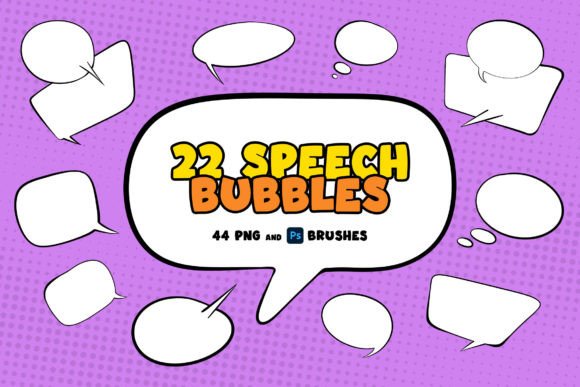
This particular set includes 22 unique speech bubbles tailored for comic book styles. The variety ensures that you are not repeating the same shape over and over, which keeps the visual experience dynamic. Each bubble has its own personality—some are round and bubbly, others are jagged for shouting, and some are elongated for thoughtful narration. This diversity allows you to match the bubble shape to the tone of the dialogue, enhancing the emotional impact of your message.
Understanding the File Formats and Features
To truly get the most out of these assets, it is important to understand what is included in the package and how each format serves a different purpose. This set is comprehensive, offering three distinct ways to integrate these bubbles into your projects:
- 22 PNG files with transparent backgrounds: These feature just the black outline. They are ideal when you want the background of your image or page to show through the bubble. This is perfect for complex illustrations where a solid white box would obscure important details.
- 22 PNG files with white fill and black outline: These are ready-to-use bubbles that provide a clean, high-contrast area for your text. They are excellent for busy backgrounds where readability is a priority. You simply place them over your artwork and type your text on top.
- .ABR Photoshop brush set: This includes 22 brush stamps of the speech bubble outlines. Brushes allow for rapid placement and scaling directly within your workflow, offering a more fluid design experience compared to dragging and dropping individual image files.
The inclusion of both transparent and filled versions gives you flexibility. If you are designing a minimalist poster, the transparent outlines might suffice. However, if you are creating a dense comic strip with detailed backgrounds, the white-filled versions ensure your text remains legible.
Practical Applications for Creators and Businesses
You might wonder where exactly these assets fit into your daily work. The applications are far broader than just comic books. Here are several realistic scenarios where Hand Drawn Speech Bubbles add significant value:
Educational Content and E-Learning
Teachers and instructional designers often struggle to make dry material engaging. Adding comic-style elements can transform a boring slide deck into an interactive story. Use the bubbles to highlight key tips, pose questions, or simulate a conversation between characters explaining a concept. The hand-drawn aesthetic makes learning feel less formal and more accessible.
Social Media Marketing
In the fast-paced world of Instagram, TikTok, and LinkedIn, stopping the scroll is crucial. Memes and quote graphics perform exceptionally well when they feel authentic. Instead of using standard text boxes, overlay your quotes on these speech bubbles. They frame the message effectively and add a visual hook that draws the eye. Small business owners can use them to showcase customer testimonials in a fun, relatable way.
Digital Planning and Journaling
The digital planning community is vast, with many users creating planners on tablets. These PNGs can be imported into apps like GoodNotes or Notability to add decorative elements to daily logs. They are perfect for noting down thoughts, reminders, or funny moments in a visually appealing manner.
How to Install and Use the Photoshop Brushes
For those using Adobe Photoshop, the .ABR file offers the smoothest integration. Installing the brushes is straightforward and does not require advanced technical skills. You have two simple options:
- Double-click method: Locate the .ABR file on your computer and double-click it. Photoshop should automatically load the brushes into your preset manager.
- Drag and drop: Open Photoshop and drag the .ABR file directly onto the canvas or into the brushes panel. This is often the quickest way to import new tools.
Once installed, select the Brush Tool, find your new speech bubble stamps, and click anywhere on your canvas to place them. You can easily resize them by adjusting the brush size before clicking, giving you instant control over the dimensions.
Important Considerations for Best Results
While these assets are designed to be user-friendly, there are a few things to keep in mind to ensure professional results. First, consider resolution. Ensure that the PNG files you choose match the resolution of your project. If you are designing for print, use the highest quality settings available. For web use, standard screen resolution is usually sufficient.
Second, think about contrast. If you are using the transparent outline version, make sure the background behind the bubble is not too cluttered. If the lines of the bubble get lost in the artwork, switch to the white-filled version. Readability should always be your top priority.
Finally, respect the style. These bubbles are hand-drawn, so they pair best with other organic, sketchy, or informal elements. Using them alongside rigid, corporate vector graphics might create a stylistic clash. Try to maintain a cohesive look throughout your design by matching fonts and other graphical elements to the casual, comic-book vibe of the bubbles.
By incorporating Hand Drawn Speech Bubbles into your projects, you are not just adding text containers; you are adding character. Whether you are streamlining your design process with brushes or enhancing readability with filled PNGs, this set provides the tools needed to communicate more effectively and creatively.