Procreate Iris Stamps: Elevating Digital Art with Realistic Eye Details
Digital illustration offers boundless creative freedom, yet certain elements remain notoriously difficult to master. Among these, the human eye stands out as a focal point that can make or break a portrait. Achieving the intricate textures, reflections, and depth of an iris requires patience, precision, and often, hours of meticulous layering. For artists seeking efficiency without sacrificing quality, Procreate Iris Stamps have emerged as an indispensable resource. These specialized tools transform a complex rendering process into a seamless workflow, allowing creators to focus on expression and composition rather than getting bogged down in repetitive detailing.
The demand for high-quality digital assets has grown alongside the popularity of tablet-based art. Artists are no longer just looking for basic shapes; they need resources that integrate naturally into their existing workflows. This is where a dedicated set of Procreate brushes designed specifically for ocular details becomes invaluable. By utilizing pre-made, high-resolution stamps, illustrators can maintain consistency across characters while significantly reducing production time. Whether you are working on character design, fashion illustrations, or realistic portraits, understanding how to leverage these tools can dramatically enhance your artistic output.
Overcoming the Challenge of Detailed Eye Rendering
Rendering a realistic eye is one of the most challenging tasks in digital painting. The iris is not a flat circle of color; it is a complex structure featuring radial fibers, crypts, collarettes, and subtle variations in pigment. Traditional methods involve building up these layers manually, which can be time-consuming and prone to inconsistency, especially when drawing multiple characters. Many artists struggle to keep the style uniform or find themselves spending disproportionate amounts of time on a single feature.
This is precisely the gap that Procreate Iris Stamps fill. Instead of painting every fiber from scratch, artists can use a stamp brush to place a fully rendered, realistic base instantly. This approach addresses the common pain points of time management and technical difficulty. It allows beginners to achieve professional-looking results while enabling experienced professionals to speed up their workflow during tight deadlines. The goal is not to replace artistic skill but to provide a robust foundation upon which custom details can be added.
How Procreate Iris Stamps Enhance Your Workflow
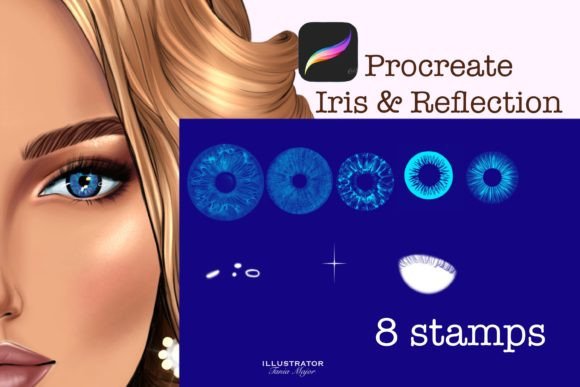
The primary advantage of using a dedicated stamp set lies in its simplicity and flexibility. A typical high-quality set, such as one containing eight distinct Realistic Iris Stamp designs, offers variety without overwhelming the user. Each stamp is crafted to mimic the natural irregularities of the human eye, ensuring that the result looks organic rather than mechanical. When you select a stamp for procreate, the process is intuitive: you simply touch the screen once to place the image. This immediacy keeps the creative momentum going, preventing the frustration that often accompanies complex tool settings.
Furthermore, these brushes are fully customizable. Unlike static images pasted onto a canvas, Procreate eye stamp brushes interact with the app’s native color and transformation tools. You can change the color of the stamp to match any character design, from deep browns to vibrant fantasy hues. Adjusting the size is equally straightforward, allowing you to scale the iris to fit different face shapes or perspectives. This level of control ensures that the stamp serves your vision, rather than dictating it. The ability to tweak these parameters means that no two eyes need look exactly alike, preserving the uniqueness of each portrait.
Practical Applications for Different Types of Artists
The utility of Procreate Iris Stamps extends across various artistic disciplines. Character designers, for instance, often need to iterate quickly through multiple concepts. Having a library of ready-made irises allows them to test different looks rapidly. If a character’s personality changes from shy to fierce, the artist can swap the eye style or adjust the color palette in seconds, facilitating a more dynamic design process.
Fashion illustrators also benefit significantly from these tools. In fashion sketching, the eyes are often stylized but still require a sense of life and depth. Using a Stamp Brush provides a polished finish that elevates the overall presentation of the sketch. Similarly, comic book artists and storyboarders who work under strict deadlines can use these stamps to maintain visual consistency across panels without exhausting their energy on repetitive details.
Even hobbyists and beginners find immense value in these resources. For those still developing their anatomy skills, having a realistic reference built into the brush helps them understand how light interacts with the eye. It serves as both a tool and a learning aid, demonstrating how highlights and shadows should be placed to create volume. By starting with a solid base, new artists can build confidence and gradually learn to add their own manual touches over time.
Technical Compatibility and Implementation
To get the most out of these tools, it is essential to ensure technical compatibility. Procreate brushes of this nature are designed exclusively for the Procreate iPad app. They require Procreate Version 5 or higher to function correctly, as earlier versions may not support the specific brush engine features used to create the stamp effect. Before purchasing or downloading, users should verify their app version to avoid compatibility issues.
The installation process is straightforward but requires attention to detail. After downloading the brushes file directly to your iPad, you must import the brush set into the Procreate app. This is typically done by tapping the plus sign in the brush library and selecting "Import." Once installed, the Procreate Iris Stamps will appear in your designated brush group, ready for immediate use. It is recommended to organize these brushes in a dedicated folder within your library for easy access during projects.
Maximizing Creativity with Customization
While the stamps provide a realistic base, the true magic happens when you make them your own. Do not hesitate to layer additional effects over the stamped iris. Adding manual highlights, adjusting the opacity, or blending edges with a soft eraser can help the eye integrate seamlessly with the surrounding skin tones. Because the set contains multiple variations, you can mix and match elements from different stamps to create entirely new eye types.
Consider the lighting environment of your artwork. A stamp placed in a dimly lit scene will require different adjustments than one in bright sunlight. Use Procreate’s blending modes to experiment with how the iris interacts with underlying layers. Multiplying the stamp can deepen the colors, while screening can create a glowing, ethereal effect. These small adjustments transform a standard asset into a bespoke element of your art.
In conclusion, Procreate Iris Stamps represent a smart investment for any digital artist looking to streamline their workflow and enhance the quality of their portraits. By addressing the common challenges of eye rendering, these tools offer a practical solution that balances efficiency with artistic integrity. Whether you are a seasoned professional or an enthusiastic beginner, integrating these Procreate eye stamp brushes into your toolkit can open new avenues for creativity and productivity. Embrace the technology, customize the results, and let your characters’ eyes tell their story with clarity and depth.