Streamlining Digital Lettering with the Hello Party Font Procreate Brush
In the rapidly evolving landscape of digital illustration, efficiency is often just as valuable as artistic talent. For designers, social media managers, and hobbyists using the iPad, the pressure to produce high-quality visual content quickly is constant. This is where specialized tools like the Hello Party Font Procreate Brush set enter the workflow. Rather than manually lettering every invitation, greeting card, or pattern design, creators can leverage pre-made stamp brushes to maintain consistency while significantly reducing production time. This analysis explores the practical utility, installation process, and real-world application of this specific brush set, helping you determine if it aligns with your creative needs.
Understanding the Tool: More Than Just a Font
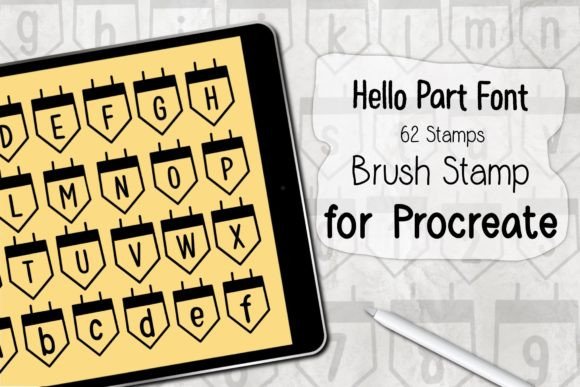
At its core, the Hello Party Font Procreate Brush is not a traditional typeface that you type out via a keyboard. Instead, it is a collection of 62 individual stamp brushes designed specifically for the Procreate application. Each brush represents a character, symbol, or decorative element from the "Hello Party" font style. When you tap the screen with your Apple Pencil or compatible stylus, the brush stamps the corresponding glyph onto your canvas.
This distinction is crucial for users accustomed to standard text tools. Stamp brushes offer a tactile, hand-placed feel that automated text boxes sometimes lack. They allow for organic spacing, rotation, and layering, which is particularly beneficial when creating whimsical patterns, custom logos, or hand-lettered effects that need to look authentic rather than digitally rigid. The set includes a comprehensive range of characters, ensuring that you have the necessary components to spell out phrases, create borders, or fill background textures without switching between multiple tools.
Key Characteristics and Technical Specifications
To evaluate the effectiveness of any digital asset, one must look at its technical foundation. The Hello Party Font Procreate Brush is distributed as a ZIP file containing a single .brushset file. This format is native to Procreate, ensuring seamless integration. The set requires Procreate version 5.0 or higher, which is a reasonable baseline given that most active users keep their apps updated for performance and feature access.
The hardware requirements are straightforward but strict. You need an iPad (Pro models are recommended for optimal performance, though other compatible iPads work) and an Apple Pencil or a pressure-sensitive stylus. Because these are stamp brushes, pressure sensitivity may affect the opacity or size depending on the default settings, but the primary interaction is positional. The fact that there are 62 stamps suggests a well-rounded kit that likely includes uppercase letters, lowercase letters, numbers, and possibly punctuation or decorative flourishes, providing enough variety for most short-form text projects.
Installation and Usability: A Frictionless Experience
One of the strongest selling points of this product is its ease of installation. For professionals who manage dozens of assets, a complicated setup process is a deterrent. The Hello Party Font Procreate Brush eliminates this friction through a simple three-step process:
- Download and Unzip: After purchasing, you receive a ZIP file. Extracting this reveals the
.brushsetfile. - Open in Procreate: By selecting the "Open In Procreate" option from your file manager or email attachment, the app launches automatically.
- Automatic Installation: Procreate recognizes the file type and installs the brushes directly into your library. No manual importing or folder sorting is required initially.
Once installed, the brushes appear in your Brush Library, ready for immediate use. This immediacy is vital for freelancers working under tight deadlines. You can start creating within minutes of download, allowing you to focus on design rather than technical troubleshooting. The user interface within Procreate remains intuitive; you simply select the brush from the list and begin tapping on the canvas.
Practical Applications and Workflow Integration
Who benefits most from the Hello Party Font Procreate Brush? The answer lies in the nature of the projects involved. This tool is exceptionally well-suited for:
- Greeting Card Designers: Creating personalized cards for birthdays, holidays, or events becomes faster when you can stamp festive lettering instantly.
- Social Media Content Creators: Instagram stories, Pinterest pins, and Facebook posts often require catchy, hand-written style headers. This brush set allows for quick typography that stands out against photographic backgrounds.
- Pattern Makers: By repeating specific letters or symbols from the set, you can create seamless patterns for textiles, wallpapers, or packaging designs. The consistency of the stamp ensures uniformity across the repeat.
- Educators and Planners: Teachers creating worksheets or individuals designing digital planners can use these brushes to add a friendly, approachable aesthetic to their materials.
In a real-world workflow, this brush set saves time by removing the need to adjust kerning and leading manually, as you would with a standard text box. However, it also offers more creative freedom than a static font file. You can rotate each stamp individually, change colors on the fly, and layer them with other Procreate brushes to add texture or shadow. This hybrid approach combines the speed of digital typing with the artistic flexibility of hand-lettering.
Evaluating Quality and Limitations
While the Hello Party Font Procreate Brush offers significant advantages, it is important to acknowledge its limitations to set realistic expectations. First, these brushes work only in Procreate. If your workflow involves Adobe Photoshop, Illustrator, or Affinity Designer, this asset will not be compatible. This exclusivity means it is best suited for artists who have fully committed to the iPad ecosystem.
Secondly, because these are stamps, editing text after placement is not as simple as backspacing. If you make a typo, you must erase the specific stamp and replace it. This requires a steady hand and careful planning, especially for longer phrases. For short titles or decorative elements, this is rarely an issue, but for body text, traditional text tools may still be more efficient.
Regarding quality, the clarity of the stamps depends on the resolution of your canvas. As with any raster-based brush, scaling up too much can result in pixelation. However, for standard digital outputs like web graphics and print-on-demand products at typical sizes, the quality is generally sharp and professional. The "Hello Party" style itself appears to be playful and celebratory, making it less suitable for corporate or formal documents but perfect for lifestyle and entertainment sectors.
Long-Term Value for Creative Professionals
Investing in specialized brush sets like the Hello Party Font Procreate Brush is about building a versatile toolkit. Over time, having a reliable set of stamp brushes reduces decision fatigue. When a client requests a festive banner or a cute pattern, you do not need to start from scratch or search for free fonts that may have licensing restrictions. You have a trusted asset ready to go.
Furthermore, the ability to customize each stamp—changing color, size, and rotation—means that no two projects need to look identical. This flexibility ensures that while you save time, you do not sacrifice uniqueness. For small business owners and entrepreneurs, this balance between efficiency and customization is key to maintaining a strong brand presence without burning out.
Final Recommendations
If you are an iPad user who frequently creates digital art, invitations, or social media graphics, the Hello Party Font Procreate Brush is a worthwhile addition to your library. It excels in scenarios where speed and a hand-crafted aesthetic are prioritized. While it is not a replacement for full-featured typography tools in complex layout designs, it serves as an powerful accelerator for decorative text and pattern creation.
Before purchasing, ensure your Procreate app is updated to version 5.0 or higher and that you are comfortable working within the Procreate environment. If these conditions are met, this brush set offers a safe, efficient, and enjoyable way to enhance your digital creations. By integrating such tools into your workflow, you can focus more on the creative concept and less on the mechanical execution, ultimately delivering higher quality work in less time.